Thursday, November 24, 2016

Excel formula for calculating stamp duty in Australian Capital Territory (ACT), Australia (that's where Canberra is)

Excel runs the world. If Microsoft removed nested IFs in Excel, every taxation system would transition to a flat rate overnight. Here's a stamp duty table for properties in Canberra, clearly constructed by someone who loves Excel.

I live one quarter my life in Excel, a quarter in Word, Visio and PowerPoint.

This is taken from the official ACT Revenue Office (that's state revenue, not federal). The Excel formula representing this table is as follows:

If you rely on this formula for critical financial decisions without testing it yourself, you're nuts.

Tuesday, November 22, 2016

Excel formula for calculating stamp duty in Western Australia (WA), Australia (that'd be where Perth is)

If you want to buy property in Western Australia, it's helpful to understand stamp duty liability.

Location of Perth, according to CNN.


This formula replicates the WA Department of Finance stamp duty calculator. It assumes you're an Australian citizen, aren't eligible for concessions, and are purchasing a residential property.


However, the stamp duty calculator rounds to the nearest 100. Hence, a $1000 property will have the same liability as a $1099 property. Here's another formula that calculates liability exactly, as per the WA schedule of rates


Pick whichever one makes your wildest property fantasies come true. I hope it goes without saying that you should test an Excel formula you found on the internet before making actual financial decisions. It is entirely possible for the WA government to change the stamp duty rates 3 seconds after you read this blog post.

Monday, November 21, 2016

Excel formula for calculating stamp duty in Tasmania (TAS), Australia (that'd be where Hobart is)

Here's my Microsoft Excel formula for calculating stamp duty in Tasmania (TAS), Australia.

The output of this formula doesn't match the official Tasmanian State Revenue Office's calculator, because their calculator only "rounds" the input to the nearest $100.

Example: if you enter $100,000 into the official calculator and the Excel formula, they will match. However, if you enter $100,001, the official calculator will say $2438.50 and the Excel formula will say $2435.04. In fact, if you enter any figure between $100,000 and $199,999, their calculator will give the same response. I'm not sure whether the Tasmanian SRO round their inputs to the nearest $100, or whether they follow the letter of the law when calculating liability.

I've created an additional Excel formula which replicates the behaviour of the online calculator.
You're free to pick which one you like. Either way, the maximum margin of error for this formula will be $4.50 (the liability from the highest range). If an inaccuracy of $4.50 bothers you, perhaps you shouldn't be in the property market!

Standard disclaimer applies: do not trust this formula until you have tested it yourself. It makes all sorts of assumptions like you are an Australian citizen and are not entitled to any concessional rates.

Sunday, November 20, 2016

Excel formula for calculating stamp duty in South Australia (SA), Australia (that's where Adelaide is)

Because I'm a completionist, I feel the urge to write Excel formulas to calculate stamp duty for every state in Australia. Here's the formula for South Australia from Revenues SA.


Unlike other states, Revenues SA calcualate liablility to include cents. Hence, no ROUND() in this formula.

If you're trusting an internet stranger's formula without comparing it with the official SA stamp duty calculator, you're nuts. The intent of these formulas is to calculate ballpark stamp duty.

Saturday, November 19, 2016

Excel formula for calculating stamp duty in Northern Territory (NT), Australia (that's where Darwin and Alice Springs are!)

There are 244,300 people in the NT, which is about the population of "Foxconn City" in Shenzhen, China. Darwin has the lowest population density of any capital city (43 people per square kilometer), compared to a Sydney train which can hold up to 4.3 people per square meter.

Here's an Excel formula for calculating stamp duty in NT.

The official calculator rounds to the nearest 5 cents, so I've used MROUND() to achieve the same.

Usual disclaimer applies: these Excel formulas are designed for quick ballpark estimates of property stamp duty pricing. Though they are accurate, you would be wise to confirm important calculations yourself with the official NT stamp duty calculator.

Tuesday, November 15, 2016

Excel formula for calculating stamp duty in Queensland, Australia (that's where Brisbane is)

There used to be a joke that if you wanted to know what Brisbane was like 20 years ago, you should go there now! Having grown up in Brisbane, I can now say that the joke is the cost of housing. Stamp duty makes a bad situation worse: because it isn't indexed to cost of living increases, people are liable for increasing amounts. Here's my Excel formula for calculating stamp duty in QLD if you're one of the shrinking amount of people who can afford a property.


Magic numbers:

  • 1050. This is 1.5% of $70,000. Why $70,000? It's the difference between $70,000 (upper bounds of second dutiable range) and $5,000 (lower bounds of the second dutiable range).
  • 17325. This is $1050 plus 3.5% of $465,000. Why $465,000? It's the difference between $540,000 (upper bounds of third dutiable range) and $75,000 (lower bounds of the third dutiable range).
  • 38025. This is $17,325 plus plus 4.5% of $460,000. Why $460,000? It's the difference between $1,000,000 (upper bounds of fourth dutiable range) and $540,000 (lower bounds of the fourth dutiable range).

Other numbers:
  • 0.015 is 1.5%
  • 0.035 is 3.5%
  • 0.045 is 4.5%
  • 0.0575 is 5.75%

For the mathematical purists, I've also written a long form edition that doesn't contain magic numbers.


  • In the long form, 1050 is expressed as (75000-5000)*0.015
  • In the long form, 17325 is expressed as (75000-5000)*0.015+(540000-75000)*0.035
  • In the long form, 38025 is expressed as (75000-5000)*0.015+(540000-75000)*0.035+(1000000-540000)*0.045
The sauce:

The disclaimer:
  • If you use an internet stranger's Excel formula without rigorous testing against the official Queensland OSR transfer duty calculator, you're awfully trustworthy and I have a tiger repellant rock to sell you.
Homer: Not a bear in sight. The Bear Patrol must be working like a charm.
Lisa: That’s specious reasoning, Dad.
Homer: Thank you, dear.
Lisa: By your logic I could claim that this rock keeps tigers away.
Homer: Oh, how does it work?
Lisa: It doesn’t work.
Homer: Uh-huh. Lisa: It’s just a stupid rock.
Homer: Uh-huh.
Lisa: But I don’t see any tigers around, do you? [Homer thinks of this, then pulls out some money]
Homer: Lisa, I want to buy your rock. [Lisa refuses at first, then takes the exchange]


Monday, November 14, 2016

Excel formula for calculating stamp duty in New South Wales, Australia (that's Sydney!)

Looking at the average house prices in Sydney makes me wonder, why on Earth do I live in Sydney?! Apparently the cost of living is more expensive than New York and London. Here's a picture of a AU$10.95 (US$8.26) bottle of watermelon juice.

Has Sydney gone crazy?!

I'm creating a auction guide spreadsheet that automatically calculates bidding positions. Part of the spreadsheet is calculating the NSW stamp duty liability. Here it is.


It's based off the dutiable range guide available at the NSW Office of State Revenue. It assumes you're an Australian citizen, and aren't eligible for a first home owner's benefit. Like all good Excel formulas, there are some magic numbers:
  • 175. This is 1.25% of $14,000, which is the maximum liability under the first dutiable range ($0 to $14,000).
  • 415. This is $175, plus 1.5% of $16,000. Why $16,000? The second dutiable range ($14,000 to $30,000) contains $16,000.
  • 1290. This is $175 (maximum liability under first dutiable range) plus $415 (maximum liability under second dutiable range) plus 1.75% of $50,000. Why $50,000? The third dutiable range ($30,000 to $80,000) contains $50,000.
  • 8990. This is $175 (maximum liability under first dutiable range) plus $415 (maximum liability under second dutiable range) plus $1290 (maximum liability under the third dutiable range) plus 3.5% of $220,000. Why $220,000? The fourth dutiable range ($300,000 to $1,000,000).
  • 40490. This is $175 (maximum liability under first dutiable range) plus $415 (maximum liability under second dutiable range) plus $1290 (maximum liability under the third dutiable range) plus $40490 (maximum liability under the fourth dutiable range) plus 0.045% of $700,000. Why $700,000? The fifth dutiable range is $300,000 to $1,000,000.
  • 150490. This is $175 (maximum liability under first dutiable range) plus $415 (maximum liability under second dutiable range) plus $1290 (maximum liability under the third dutiable range) plus $40490 (maximum liability under the fourth dutiable range) plus 5.5% of $2,000,000. Why $2,000,000? The sixth dutiable range is $1,000,000 to $3,000,000.
  • 0.0125 is 1.25%
  • 0.015 is 1.5%
  • 0.0175 is 1.75%
  • 0.035 is 3.5%
  • 0.045 is 4.5%
  • 0.055 is 5.5%
  • 0.07 is 7%.

For the sadists, I've produced a long form edition of the formula that doesn't have any magic numbers.


  • In the long form, 175 is expressed as (0.0125*14000)
  • In the long form, 415 is expressed as (0.0125*14000)+(0.015*(30000-14000))
  • In the long form, 1290 is expressed as (0.0125*14000)+(0.015*(30000-14000))+(0.0175*(80000-30000))
  • In the long form, 8990 is expressed as (0.0125*14000)+(0.015*(30000-14000))+(0.0175*(80000-30000)+(0.035*(300000-80000)))
  • In the long form, 40490 is expressed as (0.0125*14000)+(0.015*(30000-14000))+(0.0175*(80000-30000)+(0.035*(300000-80000)+(0.045*(1000000-300000))))
  • In the long form, 150490 is expressed as (0.0125*14000)+(0.015*(30000-14000))+(0.0175*(80000-30000)+(0.035*(300000-80000)+(0.045*(1000000-300000))))+(0.055*(3000000-1000000))
Sounds obvious, but you should verify this before use unless you are in the habit of trusting internet strangers to write financial formulas that affect your life choices. If the property you're buying is in the 7% range, then you can probably afford an accountant to calculate these things for you.

Sunday, November 13, 2016

Excel formula for calculating stamp duty in Victoria, Australia (that'd be where Melbourne and good coffee is!)

I've been looking for a house to buy which means I don't have Saturday mornings anymore, and my laptop overheats because I have 97 Chrome tabs all open at domain.com.au and realestate.com.au. (one for every affordable property remaining in Australia). As a Sydneysider, I was shocked by the low cost of housing in Victoria. A house for less than $1 million?! Surely a misprint!

Long story short, the Excel formula for calculating stamp duty in the state of Victoria is:


It's based on the duty ranges published by the Victoria State Revenue Office. The SRO also have a duty calculator which appears to be a Lotus Notes application. Go figure. The formula assumes you are an Australian citizen and are not eligible for any sort of first home owner's benefit.

BWAHAHAHAH LOTUS NOTES APP
NO SERIOUSLY WHAT CENTURY ARE WE IN


Here are the components of the Excel formula.

A1: This is the cell that contains the property value or purchase price (whichever is higher, otherwise people would sell their properties on paper for the price of a Big Mac.)

ROUND: Land duty operates on percentages, and the tax office don't bother with cents.

IF(IF(IF(x))): Stamp duty operates on a sliding scale. There are four valuable duty ranges, therefore we need 3 IF() statements to determine which range the property has liabilities in. Why not four? The first IF() evalutes whether the property is range 4 or 3, the second IF() evaluates whether the property is in range 3 or 2, and the final IF() evaluates whether the property is in range 2 or 1.

The 960000, 130001 and 25001 magic numbers: These are the dutiable value ranges.

  • If the property is below $25,000, you're subject to range 1.
  • If the property is above $25,000 but below $130,001, it's subject to range 1 and 2.
  • If the property is above $130,001 but below $960,001, it's subject to ranges 1 and 2 and 3.
  • If the property is above $960,001, it's subject to range 4 only.
Wasn't transfer duty supposed to be abolished with GST?!


The 0.055, 0.06, 0.024 and 0.014 magic numbers: These are the duty amounts.

  • 0.055 is 5.5%
  • 0.06 is 6.0%
  • 0.024 is 2.4%
  • 0.014 is 1.4%

0.06*(A1-130000), 0.025*(A1-25000): When calculating the stamp duty liability for a range, you don't calculate the liability based on the entire property value; you only calculate it on the liability within that range. Example:
  • The property price is $26,000. Liability for the first $25,000 is 1.4%. For the $1000 over this amount, the liability is calculated 2.4%. To calculate the 2.4% liability, you'd subtract $25,000 from the total property value.

The 350 and 2870 magic numbers: This is the residual amount from the previous range.

  • If you pay $25,001, your property value is in range 2, and the total liability from range 1 is $350. Your range 2 liability is calculated on top of that. 
  • If you pay $130,000, your property value is in range 3, and the total liability from range 1 and 2 is $2870. Your range 3 liability is calculated on top of that. 
  • It would be cleaner if I updated this formula so that the residual amount was calculated live. I guess I have a reason to update this blog post now. UPDATED: below!

Although I have tested my Excel formula against a number of values, you should compare its output against the official SRO website calculator before making any decisions with a financial impact larger than a McDonalds meal.


UPDATE: Yes, you can replace the 350+ and 2870+ components of the formula. No, it's definitely not cleaner. It makes the formula more complex and unmaintainable, which is what you don't want in Excel because the Excel formula bar has all the readability of hieroglyphics.

Here's what it looks like long form.


Why is 350+ replaced with (0.014*25000)? Assuming the property costs more than $25,000, the maximum liability of range 1 is $350 is 1.4% of a $25,000. This can be represented in Excel as plain jane 350, or it can be expressed long form.

Why is 2870+ replaced with (0.014*25000)+(0.024*(130000-25000))? Assuming the property costs more than $130,000, the total liability of range 1 and 2 is $2870. $2870 is made up of $350 (maximum liability of range 1) and $2520 (maximum liability in range 2).

Saturday, August 13, 2016

Visual Studio Code for macOS error: xcrun: error: invalid active developer path

One day VS Code worked, the next day it didn't. The error was

xcrun: error: invalid active developer path (/Library/Developer/CommandLineTools), missing xcrun at: /Library/Developer/CommandLineTools/usr/bin/xcrun

The problem was that macOS upgrades don't automatically update the XCode Developer Tools. To solve, execute the following shell command.

xcode-select --install

You don't need to restart VS Code for this to take effect.

Monday, June 20, 2016

VS Code Go error: package main: burger.go:1:1: expected 'package', found 'EOF'

If you get the following Go compiler error, chances are that you haven't saved your .go file before compilation.

package main:
burger.go:1:1: expected 'package', found 'EOF'

Just hit Cmd+S before running the code, otherwise the Go compiler will try to compile a file that could be empty.

Thursday, June 11, 2015

Comparison of VMware NSX training prices around the world

So, I'm trying to organise NSX training, and have found some regional differences in course prices.

VMware NSX: Install, Configure, Manage [V6.0]
Online - $4125 USD + Tax, or 15 credits
Sydney, Australia - $5140 AUD or 35 credits
Tokyo, Japan - $3300 USD + Tax, or 42 credits
Wellington, New Zealand - $2996 USD + Tax, or 38 credits
Singapore - $2400 USD + Tax, or 30 credits
Selangor, Malaysia - $2400 USD + Tax, or 30 credits
Bangkok, Thailand - $1500 USD + Tax, or 15 credits
Jakarta, Indonesia - $1200 USD + Tax, or 15 credits
Beijing, China - $976 USD + Tax, or 13 credits
Yagon, Myanmar - $824 USD + Tax, or 11 credits
Ho Chi Minh City, Vietnam - $824 USD + Tax, or 11 credits
Mumbai, India - $824 USD + Tax, or 11 credits

VMware NSX for Internetworking Experts Fast Track [V6.0]
Online (Chicago) - $5012 USD + Tax, or 63 credits
Online (London) - € 3744.00 (EUR) + Tax (if applicable), 58 credits
Hamburg, Germany - € 3744.00 (EUR) + Tax (if applicable), 58 credits
Rueil-Malmaison, France - € 3744.00 (EUR) + Tax (if applicable), 58 credits
Nieuwegein, The Netherlands - € 3744.00 (EUR) + Tax (if applicable), 58 credits
London, United Kingdom - £ 3512.00 (GBP) + Tax (if applicable), 58 credits
Madrid, Spain - € 2808.00 (EUR) + Tax (if applicable), 44 credits
Singapore - $3696 USD + Tax, or 47 credits
Bangkok - $1848 USD + Tax, or 24 credits
Makati City, Philippines - $1848 USD + Tax, or 24 credits

Lessons
  • VMware have price segmentation across the world: Oceania, Europe, United States, Asia 1 (Singapore, Malaysia, Thailand), Asia 2 (Indonesia), Asia 3 (China), Asia 4 (Myanmar, Vietnam, India).
  • IT training in a foreign country helps you focus better as you're alone and in a vulnerable state. It pushes you out of your comfort zone and allows you to immerse yourself in the learning experience.
  • Training + flights + hotels in a foreign country can often be cheaper than doing training locally! 

Tuesday, May 5, 2015

The 7th Guest: Placing eight queens on a chess board

On the return leg of my Narita to Sydney flight, I was passing time playing the classic DOS game, The 7th Guest. This game was one of the reasons I spent hundreds of dollars buying a CD-ROM drive! Today, it's available in the iTunes Store and the Google Play Store for a fraction of the cost. Today, the only way you'd spend a hundred dollars on this game would be from excess charges on a bad cellular plan.

The 7th Guest broke new ground in 1993: it was one of the first games to ship on a CD-ROM, and it used every megabyte available! You were treated to full motion video as you walked between the rooms of the beautiful haunted house, which was revolutionary at the time. Bill Gates once described it as "the new standard in interactive entertainment". Gamers around the world (including myself) scared themselves half to death as they wandered around the haunted house, solving puzzles and trying to unlock the mystery of the house.

Rated 15 and above. FOR A VERY GOOD REASON.
Enter the Queen's Puzzle: place 8 Queens on a standard 8x8 chess board such that they can't attack each other.

KHALEESI!!!
If you've read this blog, you'll notice I like chess. One of my old hobbies was writing a chess simulator in C.

Chess in C (Part 1)
Chess in C (Part 2) - Insert Pawn Pun Here
Chess in C (Part 3) - Rook, Rooks, Rookies, Wookies, same thing
Chess in C (Part 4) - I'm asking for input
Chess in C (Part 5) - Potential moves of a bishop: up-left, cardinal, pope

When I saw the Queen's Puzzle, my immediate thinking was to write an app that brute forced the solution. The solution space was fairly limited:

          1. Create a 8x8 board
          2. Place a Queen in position (x,y)
          3. Mark each square reachable by the Queen as attackable
          4. Iterate through the remainder of the board until you reach a square that cannot be attacked
          5. Place a Queen in this square
          6. Go to step 4 and repeat until there are 8 Queens on the board.

For step 2, position (x,y) would start as (1,1).
For step 4, the next square that could not be attacked would be position (x+2, y+1). So, if the first Queen is in (1,1), the next Queen would be placed in (3,2).

Unfortunately, I was on a plane and didn't have access to an IDE so I simulated with pen and paper.

Solving problems the old fashion way: pen, paper and swearing.
Queens placed at (1,1), (2,3), (3,5), (4,7), (5,2), (6,4), (7,6) and DARN IT!
Close, but no cigar! Only seven Queens fit. The algorithm fails at step 4: there are no squares that cannot be attacked. I refined the algorithm with two more steps:

          7. Clear the board
          8. Go to step 2, and place a Queen in the next available square.

This meant that instead of placing the Queen in position (1,1), placing it in position (1,2).

Great success!
I solved it and the returned to the next 7th Guest puzzle: swapping the position of 8 bishops on a 4x5 board. That puzzle was AWFUL.

You want to know what's worse than flying 10 hours on a budget carrier that hates you?
More on that in a later blog post.

But, being stuck on 10 hour NRT-SYD flight I thought...what would happen if the chess board was 3D and had a Z-dimension? If you can place 8 Queens on a chessboard of size 8x8, how many Queens can you place on a chessboard of size x-y-z? There is such thing as 3D chess: one of the more common configurations is the Raumschach board which is a 5x5x5 board. The inventor believed that chess should be like warfare: you can be attacked from the plane you are on, but also from above (aerial) and below (underwater).

Board size reduced from 8x8, otherwise you'd spend
months figuring out whether your move was legal.
I started by drawing a 8x8x3 board to get a ballpark idea of the complexity of the problem. Then I placed the 8 Queens on the top layer, and drew the possible attack spaces throughout the other layers.


After diagramming, it becomes clear that there are lots of places for a Queen to hide on an 8x8x3 board. While the Queen can move diagonally over a Z dimension, it has a weakness: the further you are away on the Z dimension, the more clear spots appear. And it's at that point I fell asleep and enjoyed the rest of my flight. The moral of the story: if you need to burn time on a flight, The 7th Guest as a great time waster. But if you want to have hair when you depart the plane, download the strategy guide as well.

Monday, January 26, 2015

Automating Certificate Signing Requests (CSR) generation for Dell iDRAC

I've been trying to get Puppet to automate the issuing of certificates to the iDRAC (Dell Remote Access Controller) for PowerEdge servers. One of the problems with Dell iDRACs is that on a certain batch of servers, the default key length was too short (1024 bit), rather than the minimum key length required by most Issuing Certificate Authorities (2048 bit).

Bumping the Certificate Signing Request (CSR) key length to 2048 bits requires the use of the racadm.exe utility: there is no way to change the CSR key length from the iDRAC UI, at least not in version 7.

Here are the steps you'll need to automate the generation of CSRs for all new servers that identify themselves as Dell.

Changing the CSR cryptographic key length size

racadm.exe -r dellServer.myCloud.local -u "DRAC_USERNAME" -p "DRAC_PASSWORD" config -g cfgRacSecurity -o cfgRacSecCsrKeySize 2048

Changing the CSR Common Name

racadm.exe -r dellServer.myCloud.local -u "DRAC_USERNAME" -p "DRAC_PASSWORD" config -g cfgRacSecurity -o cfgRacSecCsrCommonName "dellServer.myCloud.local"

Changing the CSR Organisation Name

racadm.exe -r dellServer.myCloud.local -u "DRAC_USERNAME" -p "DRAC_PASSWORD" config -g cfgRacSecurity -o cfgRacSecCsrOrganizationName "BURGER BURGER BURGER Pty Ltd"

Changing the CSR Organization Unit

racadm.exe -r dellServer.myCloud.local -u "DRAC_USERNAME" -p "DRAC_PASSWORD" config -g cfgRacSecurity -o cfgRacSecCsrOrganizationUnit "Security Operations"

Changing the CSR Locality

racadm.exe -r dellServer.myCloud.local -u "DRAC_USERNAME" -p "DRAC_PASSWORD" config -g cfgRacSecurity -o cfgRacSecCsrLocalityName "Sydney"

Changing the CSR State

racadm.exe -r dellServer.myCloud.local -u "DRAC_USERNAME" -p "DRAC_PASSWORD" config -g cfgRacSecurity -o cfgRacSecCsrStateName "NSW"

Changing the CSR Country

racadm.exe -r dellServer.myCloud.local -u "DRAC_USERNAME" -p "DRAC_PASSWORD" config -g cfgRacSecurity -o cfgRacSecCsrCountryCode "AU"

Changing the CSR e-mail address

racadm.exe -r dellServer.myCloud.local -u "DRAC_USERNAME" -p "DRAC_PASSWORD" config -g cfgRacSecurity -o cfgRacSecCsrEmailAddr "pki@burgerburgerburger.com"

Resetting the iDRAC unit

racadm.exe -r dellServer.myCloud.local -u "DRAC_USERNAME" -p "DRAC_PASSWORD" racreset soft

Generating the CSR

racadm.exe -r dellServer.myCloud.local -u "DRAC_USERNAME" -p "DRAC_PASSWORD" sslcsrgen -g -f "C:\temp\dellServer.mycloud.local.csr"

Once you've approved the CSR, you'll get a nice minted certificate you can use to eliminate those pesky iDRAC errors. It should look something like this (if you're using Chrome on OSX)


I've blacked out the Issuing CA details, but all the details in the certificate Subject Name
match with the script above.

Some other areas that you may want to automate in your environment include
  • Configuration of SNMP (for hardware alerting)
  • Uploading the certificate
  • Renaming the default iDRAC user account and setting a strong password
  • Disabling features that are not required
  • Changing the default IPMI key
Remember, once you've automated it for one server, the next 1000 servers are easy!

One caveat: I think iDRAC is unstable or has a memory leak: generating a Certificate Signing Request (CSR) only works reliably if you reset the iDRAC beforehand. Once I added this step in, the CSR generation process became more reliable.

Friday, January 23, 2015

Certificate Templates not appearing in Windows Server 2012 R2-based Microsoft Certificate Authority (CertUtil error 0x80070057)

You may have created some certificate templates in your Microsoft Certificate Authority (CA), such as a template for your VMware hosts. Derek Seaman has a good blog post on the exact settings and extensions required.

After creating a certificate template, I had a problem enabling it in the CA. While the certificate template appeared in the Certificate Templates console, it couldn't be enabled. The certificate template just wasn't appearing in the Certification Authority MMC snapin.

It appears in Certificate Templates..

...but you can't enable it. Because it doesn't appear.
IT JUST DOESN'T APPEAR. WHY??!?!?!?!?!?!?!
WHERE ARE THE ERROR MESSAGES MICROSOFT?!?!?!?

I tried using the certutil.exe command to enable the certificate template manually

certutil.exe -SetCATemplates VMware-SSL

Unfortunately, same problem: certificate template wasn't enabled, but this time I got a deceptive and nonsensical error message complaining that the "parameter" was "incorrect".

CertUtil: -SetCATemplates command FAILED: 0x80070057 (WIN32: 87 ERROR_INVALID_PARAMETER).
CertUtil: The parameter is incorrect.


When you create a certificate template, it needs time to replicate to all domain controllers. A certificate template is just another object in Active Directory, just like a user or computer account. So if the certificate template doesn't appear immediately, just wait the same amount of time you'd wait for a user to replicate across your DCs.

Back to our problem: why isn't the certificate template appearing? Well, it turns out that every online certificate enrolment service has to have contacted Active Directory and downloaded the certificate templates before it can be enabled. If you've previously configured an issuing CA and then destroyed it without cleaning up its entries, you'll never be able to enable the certificate template.

Performing a cleanup of issuing CAs in Active Directory Certificate Services

It's ADSI Edit Time!

Open ADSI Edit and connect to the Configuration context.

Select a well known Naming Context like Configuration, or Paul, or Jimmy.
If you see the names of OUs, you connected to the wrong context.

Navigate to CN=Certification Authorities,CN=Public Key Services,CN=Services,CN=Configuration in your domain.

CN=Certification Authorities contains your root CAs and CN=Enrollment Services contains your issuing CAs. If there are any extra CAs listed that no longer exist, you'll need to delete them.


In my case, I had an additional issuing CA in CN=Enrollment Services that no longer existed. When I deleted the CA, I could enable the template.

Yes!

But I want to do everything from the command line because I want to use Server Core in the future.

Now you understand why the original error message "The Parameter is incorrect" is deceptive.
This is the same command that was run last time.

Unfortunately there are no event log error messages for this error. Microsoft just expect you to figure it out.

Monday, January 12, 2015

Errors installing VMware ESXi dump collector: it's probably your complex password!

The VMware ESXi dump collector installer has some vague error messages.

Error 1: Login failed due to a bad user name or password.

"Login probably failed due to a bad user name or password" would
be a more accurate error message.
Causes

  • The username is incorrect.I'm assuming you've verified the username and password are correct. If you haven't done this, try logging into Windows with the credentials and see if they are valid.
  • The user account does not permission in vCenter.Ensure the user account has permissions in vCenter. For the duration of troubleshooting, you may wish to give the user account administrative access. If you look at the netdump-reg-debug.txt file, you can see the following error.

    ERROR:ndreg-app:error: cannot connect to VC -- (vim.fault.NoPermission) {
       dynamicType = <unset>,
       dynamicProperty = (vmodl.DynamicProperty) [],
       msg = 'Permission to perform this operation was denied.',
       faultCause = <unset>,
       faultMessage = (vmodl.LocalizableMessage) [],
       object = 'vim.Folder:group-d1',
       privilegeId = 'System.View'
    }
  • Your password contains the special character "VMware haven't escaped parameters correctly. Remove the " from your password and try again.


Error 2: Error 29457. A specified parameter was not correct.


Of the 30,000 error messages, I received error 29457.

Causes

  • Your password contains the character ;Fool me once, shame on you. If you look at the vminst.txt log file, you'll see something like

    esxiInstUtil: 01/12/15 13:06:12 ExecuteCmd::Cmd:  --register --address "vc.cloudlab.local" --user "svcvmwaredump@cloudlab.local" --password "*****" -s "vUq<~[" --thumbprint "C:\ProgramData\VMware\VMware ESXi Dump Collector\vmconfig-netdump.xml"

    The passwords I use are generated by a password management tool, which makes long non-sensical passwords with lots of special characters like !@#$%^&*();. Unfortunately, VMware haven't properly escaped the password field so installation will fail if the password contains the character ;

    In this case, my password was JI@$QH$7*@eie$Hhg8;vUq<~[. The installer thinks my password is JI@$QH$7*@eie$Hhg8, ignored the ;  and has left the vUq<~[ dangling.

Monday, December 1, 2014

Upgrading Dell PowerEdge R710 firmware without an OS installed (how hard could it be?!)


I've been automating the firmware update process for the Dell PowerEdge R710-series of servers. The intent of this automation is to ensure that all servers in the data centre have the exact same firmware levels, and to ensure that the automated installation of VMware ESXi on the servers will successfully complete without human intervention.

Before automating this process, I first had to understand how the manual Dell firmware update process was performed. I was disappointed to find that the firmware update process for Dell servers was poorly documented, not reliably reproducible (the anathema of scripting and process automation) and simply downright buggy.

The process was not as straightforward as I thought it would be: how hard could it be to update the firmware of a commodity Dell server? Well, it turns out that many Dell R710s ship with an expired Lifecycle Manager certificate, which prevents the application of Dell updates signed after a certain date! The process involved:

1) Updating the iDRAC firmware
2) Updating the expired Lifecycle Manager certificate using a Lifecycle Manager Repair Package
3) Updating other firmware within the server

There are bugs in the installation of Dell Update Packages (DUPs). If at first the DUP doesn't apply, just try again! I've pointed out where this occurs to help you script around it. It's fairly disappointing from Dell: after eleven generations of servers, Dell still haven't figured out how to streamline the firmware update process. Oh well. If Nutanix eats your lunch, don't act surprised.

To proceed, you'll need to have made an update repository using the Dell Repository Manager.

Step 1. Download the latest iDRAC6 firmware

If you go to the iDRAC6 page on the Dell TechCenter, you'll have a choice between downloading a monolithic or blade version of iDRAC. Because you are upgrading firmware on an R710 (rackmount), you'll want the monolothic version. Monolithic is Dell's term for standalone server as opposed to blade server.

The latest version of the Dell iDRAC 6 is v1.98 and the filename is firmimg.d6. You can download it here.


Step 2. Download the Lifecycle Manager Repair Package (only for Dell R710)

If you have a Dell PowerEdge R710, the certificates used by the Dell Lifecycle Manager have expired. Lifecycle Manager is a component on Dell servers that manages the application of firmware updates to the BIOS, motherboard, network adapters, et cetera. If you try to apply any updates without applying the Lifecycle Manager Repair Package, you'll get the error message "The updates you are trying to apply are not Dell-authorized updates."

The latest version of the Dell Repair Package is V 1.5.5, A0 and the filename is BDF_1.5.5_BIN-12.usc. You can download it here.

Step 3. Update the iDRAC firmware

The iDRAC firmware needs to be updated to at least 1.97 so the Lifecycle Manager Repair Package can be applied. Updating iDRAC firmware can be done remotely or via the console (if you feel like freezing to death in your data centre/server closet/broom closet).

Step 3.1. Log into the iDRAC

If you don't know the password for your Dell iDRAC, try the default password combination.
Username: root
Password: calvin
I'm not sure who Calvin at Dell is. I might check on LinkedIn later when I'm waiting 40 minutes for a firmware update to complete.


Step 3.2. In the iDRAC, click iDRAC Settings (in the left menu bar)

On this page, verify the iDRAC firmware version.


Step 3.3. Click on the Update tab

For the record, Google Chrome on Mac works for uploading files.


Step 3.4. Select the iDRAC update package.

Click Choose File, and select the iDRAC update package downloaded in step 1.
The latest iDRAC 6 update package should be called firmimg.d6


Step 3.5. Confirm the old and new version, then click Next

Verify that the New Version is newer than the Current Version, then click Next.


Step 3.6. Wait for the iDRAC Firmware Image to be updated

This typically takes less than 5 minutes. After the iDRAC firmware is updated, the iDRAC will restart and may become unresponsive for a minute. You will need to login again.


Step 3.7. Verify the new iDRAC version has been installed

Once the firmware update is complete, log into the iDRAC again and verify that the existing iDRAC version matches the new version.


Step 4. Repair the Lifecycle Manager (for R710 only)

Updating the Lifecycle Manager will allow you to apply firmware updates to the rest of the system. You must have an iDRAC firmware version of at least 1.97 to continue.

Step 4.1. Upload the Lifecycle Repair Package

In the iDRAC interface, go to the Firmware Update screen and upload the Lifecycle Repair package. The filename should be BDF_1.5.5_BIN-12.usc.


Step 4.2. Confirm the package name

The package name should be System Services Recovery Image. Click Next to continue.


Step 4.3. Confirm upload

Click OK to proceed with the update.


Step 4.4. Wait for the Lifecycle Manager to update

It is common for the update to be stuck at 10% for approximately 3-4 minutes.


Step 4.5. If the upload fails, restart the iDRAC.

It is common for the update to fail. If this is the case, try applying the update multiple times. It is not uncommon for the update to take 3-4 attempts. If applying the update still fails, restart the iDRAC and try again. The link to restart the iDRAC is in the Quick Links section on the System Summary page.


Step 4.6. Complete update

When the update is complete, leave the iDRAC open. You may need to use it.


Step 5. Update the remainder of the server firmware

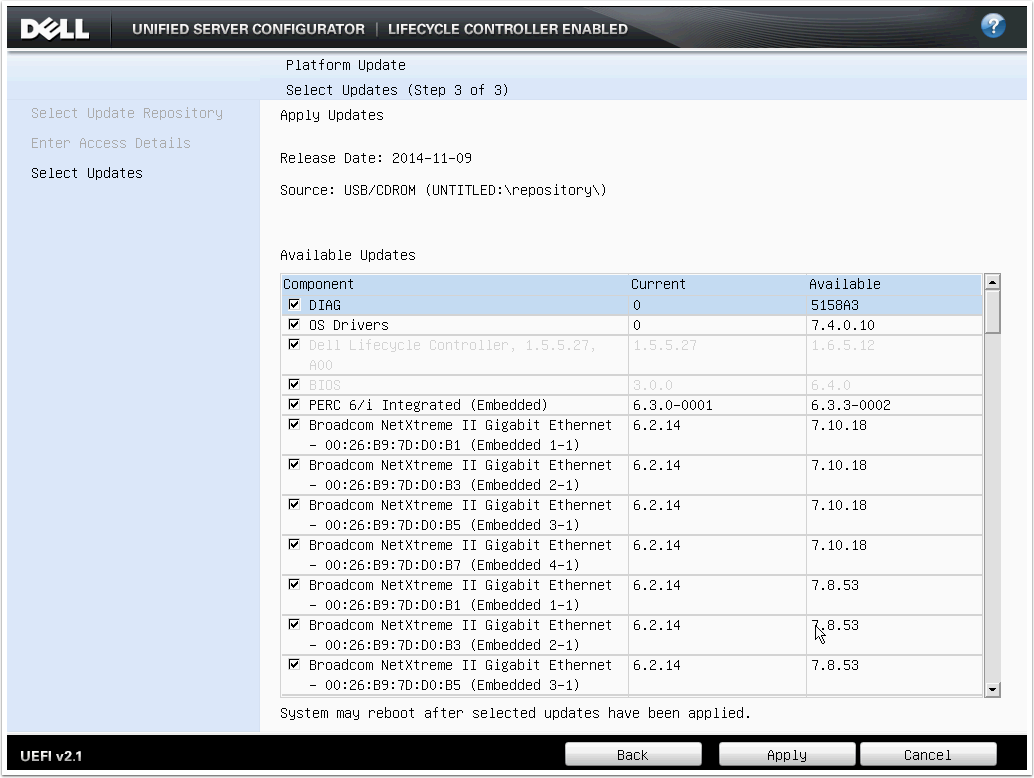
Lifecycle Controller allows you to update the other firmware in the server. This includes
  • Diagnostic utilities
  • Dell Lifecycle Controller
  • BIOS
  • PERC 6/i Integrated (Embedded)
  • Broadcom NetXtreme II Gigabit Ethernet (Embedded)
Here's an image of the typical firmware components that can be upgraded on a Dell server.


Step 5.1. Boot the server to the Unified Server Configurator

When the server is booting, press F10 to boot to the Unified Server Configurator. Dell also labels this as System Services.
If you have pressed F10 in time, you will see the message Entering System Services. To cancel, enter the IDRAC6 Configuration Utility
You can skip the memory test by pressing Esc.


Step 5.2. Wait for Unified Server Configurator to start

This can take several minutes.


Step 5.3. Start the Platform Update

You see the message reading "Warning: A system update is recommended since some components are potentially out of date. Please go to Platform Update to view and run availabile updates."? It's useless. It always appears due to a bug in the way Dell compares version numbers for the PERC 6/i.
At the Unified Server Configurator screen, click Platform Update.


Step 5.4. Launch the Platform Update

On the Platform Update screen, click Launch Platform Update.


Step 5.5. Select the update repository source

If you have a small number of servers (less than 5), it is easier to update via USB. Updating via FTP server or network share is possible, but introduces complexity: there needs to be appropriate network connectivity and credentials configured.


Step 5.6. Select the source

You need to have a repository file or folder that contains all the Dell updates relevant to your server. Repositories are created using Dell Repository Manager.


Step 5.7. Confirm use of the existing catalog file

This error is normal and will appear for any ISO created by the Dell Repository Manager. Click Yes to continue.


Step 5.8. Wait for the image to be verified

This can take up to 2 minutes. They're not lying.


Step 5.9. Review the list of firmware updates to be applied

When you have reviewed the list of firmware updates being applied, click Apply to begin.


Step 5.10. Wait for all Dell Update Packages (DUP) to be copied and verified


Step 5.11. Wait for the updates to be applied

This can take up to 45 minutes. The elapsed time may freeze: this is normal. During this process, there will be multiple reboots. Do not interrupt the reboots. You may click Esc to cancel the memory test during the reboots to speed the process.


Step 5.12. Wait while the server reboots multiple times

During the reboots, the screen may be blank for several minutes. This is normal.


Step 5.13. Wait to be returned to the Unified Server Configurator screen

Wait to be returned to the Unified Server Configurator screen.


Step 5.14. Verify that all updates have been applied

When all updates have been applied, the server will return to the Unified Server Configurator screen. You can verify that updates have been applied by comparing the Current version with the Available version. These should be the same, with the exception of the PERC 6/i Integrated (Embedded). Due to a bug in the way Dell compares the versions, it will appear as requiring an update (the PERC 6/i reports it version as 6.3.3.0002, while the update package has the version 6.3.3-0002 which it thinks is older). A messaging saying everything is up to date would have been nice, but hey, that'd require a focus on the user experience!

If all the updates have been applied successfully, click the Cancel button.


Step 5.15. Exit the USC

At the Unified Server Configurator screen, click Exit and Reboot to boot the server normally.


Step 5.16 Confirm the exit

Click Yes to exit the USC.


And there you have it: an updated Dell PowerEdge R710 server! Next step: automate it.