Monday, February 27, 2012

printf and types

This blog started as a notepad for lessons learnt. My career requires me to live in fluffy architect land (it's like real life except there's lots of whiteboards and clouds) and sometimes I struggle to remember how to solve hands-on problems. I started by keeping a notepad. Several lost notepads later, I upgraded to the  Evernote online notepad service. I like to keep a unique password for each online service. Having a unique password means that if a single site is compromised, your credentials on other sites remain secure. To make a long story short, I started blogging my problems so I wouldn't have to recall a password to access the knowledge that should have been in my head in the first place.

This blog post is about a basic printf problem in C which is different from the usual virtualization/architecture/licensing content on this blog. Hey, this is my blog, I can write about anything I want: next blog post is all cake recipes! I'm learning C because I want a challenge and I'm sick of Java. I'm blogging about it so I can remember my mistakes and serve as a warning to others not to learn C. If several months have passed and this is the only blog post on C, you can assume I've given up and that you shouldn't learn C either.

Anyway, now it's time to spot the error in my code. The following code stores records the temperature of three bagels and stores them in array bagelTemperature.

bagelTemperature[0] = 15;
bagelTemperature[1] = 17;
bagelTemperature[2] = 12;


printf("The bagel temperatures are\n");
printf("%d\n", bagelTemperature[0]);
printf("%d\n", bagelTemperature[1]);
printf("%d\n", bagelTemperature[2]);


printf("The bagel temperatures are\n");
printf("%x\n", *(bagelTemperature));
printf("%x\n", *(bagelTemperature+1));
printf("%x\n", *(bagelTemperature+2));

will output

The bagel temperatures are
15
17
12
The bagel temperatures are
17
22
41

Why are the two bagel temperatures different?

Simple mistake: the type field in the second set of printf statements is incorrect. Replace the %x and %d and the bagel temperatures will be good. %d is for signed decimal integers and %x is for unsigned integers written with hexadecimal. If you don't select the correct type, your output might be different to what you expect. Until I realised the problem was with the type, I was scratching my head wondering if there was a problem with my pointer arithmetic.

VMware 5 Host Profiles prompts for MAC address

The good news is, host profiles in VMware 5 have been improved significantly. The bad news is, they still suck.

When trying to apply a host profile to a server, you may be prompted for a MAC address.

image

Wow, a bug in VMware host profiles! Who’d thought! At least it isn’t a crippling like the vSphere 4 “swap the vmkernel IP addresses around” bug.

Anyway, you should need to enter a MAC address every time you want to apply a host profile. That’s ludicrous. To get around this, go to the Host Profiles console (Home > Host Profiles).

image

Right-click on your Host Profile and click Edit Profile.

image

Navigate to the Determine how MAC address for vmknic should be decided setting

image

Select User must explicitly choose the policy option, then click OK.

image

If you have a separate port for VMotion, Fault Tolerance, management traffic, iSCSI, you will have to repeat this step for each of those port groups.

Done! Now remember to do this every time you create a host profile.

Sunday, February 12, 2012

Basic ISO-Schematron functions

Every blogger loves Google Analytics: oh, the voyeuristic joy of knowing what search terms people misspelled for Google to return your blog as a 'top' result is irresistible! My blog isn't popular because it's about VMware, it's because I keep misspelling VMware as WMware. Did you know my blog is the most popular WMware blog in the world?! Actually, that's not true. My blog isn't popular at all. But I'm hoping today's post about ISO-Schematron will turn more fortunes around. I'll be grabbing some search terms out of Google Analytics and answering the questions you never asked me, which is not dissimilar to hosting an unpopular talk back radio show.

I seem to get a lot of ISO-Schematron-related hits, so if you're uninterested in this topic, close your browser window now and throw your computer into a fountain. If you're interested in the XML validating magic of ISO-Schematron, feel free to read on or throw your computer into a fountain as well.

What is ISO-Schematron?

ISO-Schematron is an XML schema language. Schema languages are ways of making sure your XML is valid. Take a look at the following XML code

<dog id="500">
     <name>Chop Chop</name>
     <breed>Silky Terrier</breed>
     <dob>2012-01-05</dob>
</dog>

It's well formed XML. Without knowing too much about the XML, you can tell it describes a dog named Chop Chop. The dog has the breed Silky Terrier and a date of birth sometime in 2012. This reminds me, I better change my password reset questions now. Let's look at the same snipplet of XML code except with some creativity.


<dogPASTA
     <name>Chop Chop</name
     <breed>Silky Terrier
     <dob>2012-01-05</date fo birth y'all>
<dog> PASTAPASTASPTA


This is definitely not well formed! Not every opening tag has a closing tag, there are slashes missing and there's pasta everywhere! You don't use an XML schema language to determine whether this XML is well formed or not well formed: you use an XML syntax checker and common sense. Let's look at yet another snipplet of XML.


<dog id="500">
     <name>Chop Chop</name>
     <name>Choppy</name>
     <breed>Silky Terrier</breed>
     <dob>2012-01-05</dob>
</dog>


It's easy to tell that this XML is well formed (there's no pasta lying around, for starters). But is the XML valid? Is a dog allowed to have two names? Whether or not a dog is allowed to have two names is the decision of the owner. I, for one, welcome our multi-named dog overlords! But what if you don't? What if you believe that a dog can have one name only?! We'd be in disagreement! We'd both agree that the XML is well formed, but we would disagree on whether the XML was valid.

What is ISO-Schematron? (no really, answer my question this time).

I need to test XML code to see whether it meets some rules.

  • A dog has an ID attribute
  • A dog can have multiple names, but has to have at least one name.
  • A dog definitely has a date of birth
  • A dog must have a breed
  • A dog's date of birth cannot be in the future
With ISO-Schematron, I can write rules. Each rule will contain one or more assertions. Writing these assertions gets tricky.

Alright! Let's write assertions!

Let's start by ripping search terms out of analytics like uncreative Law & Order writers rip stories out of headlines and back episodes.

Google search term: count elements schematron children must have
Translation: Señor Paul, what ISO-Schematron could check whether an element has the correct amount of child elements?

What you're looking for is the count() function. The following snipplet will make sure you have 5 child elements.

<iso:rule context="dog">
<iso:assert test="count(breed) = 1">The dog element must have one breed element only!</iso:assert>
</iso:rule>

With a simple and, you can check for the correct amount of multiple types of child elements.

<iso:rule context="dog">
<iso:assert test="count(breed) = 1 and count(dob) = 5">The dog element must have 1 breed element and 1 dob element</iso:assert>
</iso:rule>

Easy, next!

Google search term: check schematron first element
Translation: Señor Paul, I too use ISO-Schematron to verify the validity of my XML files, possibly because I'm a student trying to cheat on my homework! Please assist me by explaining how to check if the first child element within an element is of a certain type.

Try this buster. This will check if the first element in a DiskSection element is Info.

<iso:rule context="dog">
<iso:assert test="*[1][self::name]">The first element within dog must be name</iso:assert>
</iso:rule>

Google search term: check existance of attribute schematron
Translation: do my homework for me please

First of all, you spelled existence incorrectly. I'm guessing you want to check if an element had an attribute. This snipplet checks whether the dog element has a name attribute

<iso:rule context="dog">
<iso:assert test="@id">The dog element doesn't have an ID attribute!</iso:assert>
</iso:rule>


Easy! If you have any other tricky ISO-Schematron questions, put them in the comments and I'll try to help you and then make fun of you.

Thursday, February 9, 2012

FlexLM and Furious: setting up a license server

FlexNet is a licensing framework used to control access to software. Negative people like to call it the worst piece of software ever made by human kind, but I like to think of it as the best piece of software ever made by lobotomised parakeets. This blog post demonstrates the tedious process of setting up a FlexNet license server. Although I've only described how to install a single license server, you can repeat steps 2 to 8 to serve license for as many FlexEnabled products as you like. Lucky you!

If you're unfamiliar with any of the terms in this blog post (license server, license file, vendor daemon, grand royal with cheese), read my previous blog post on the topic.

Scenario
You work for Contoso. Contoso has purchased licenses for Autodesk AutoCAD and MATLAB. You have been asked to set up a license server so the products work and your boss doesn't fire you.

Before you begin…
Software vendors usually package FlexNet with their products. Unfortunately, vendors almost universally package FlexNet in a way that prevents you from using the license server to serve other products. So don't install the FlexNet from the vendor's installer. Use my instructions instead! All your wildest dreams will come true!

Step 1 - Install the FlexNet License Manager

FlexNet is a stand-alone application that does not require installation process. This step involves downloading the latest versions of the FlexNet binaries and placing them in a folder on your server. All you need to do is
  1. Download the latest versions of the following files from the Flexera website
    1. lmtools.exe
    2. lmutil.exe
    3. lmgrd.exe
  2. Create the folder C:\Program Files\FlexNet
  3. Copy lmtools.exe and lmutil.exe to C:\Program Files\FlexNet
While I suggest using C:\Program Files\FlexNet, tossing all the files into C:\Program Files\StarCraft is okay too.

Step 2 - Identify the vendor daemon name

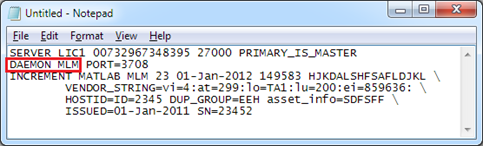
For this step, you’ll need to open your license file in Notepad. The license file is provided to you by the vendor in exchange for money.

The vendor daemon name is specified on the VENDOR line of the license file. This is illustrated in the following tiny screenshot. In this example, the vendor daemon name is MLM.
image

The vendor daemon is an executable file. If you look in your license file, the vendor name will be located after the DAEMON keyword. Now that you know what the vendor daemon name is, you can…


Step 3 – Create a subfolder under FlexNet for the vendor daemon
In this case, you’d create a folder called C:\Program Files\FlexNet\mlm


Step 4 – Find the vendor daemon
If the vendor name is MLM, the vendor daemon will be mlm.exe. If the vendor daemon name is ADSKFLEX, the vendor daemon will be adskflex.exe. Vendors typically publish the latest version of their vendor daemon in their website. If you can’t find it, try looking on your source media.


Step 5 – Assemble license server files in folder
Now copy the following files into your folder
  • the vendor daemon (which you downloaded from the vendor website)
  • lmgrd.exe (which you downloaded)
  • the license file (provided to you by the vendor)
Once you’ve done that, create the following blank files
  • vendorDaemon.debuglog
  • vendorDaemon.log
  • vendorDaemon.opt
where vendorDaemon is the vendor daemon name. Once you’ve done all this, your folder should have 6 files.


Step 6 – Register the license server as a Windows service
If you don’t register the license server as a Windows service, it won’t start when your server starts. To register a license server as a service, you’ll need to use the LMtools (lmtools.exe) utility you downloaded in step 1.


Caution: follow these instructions carefully! The LMtools application is the Ralph Wiggum of management consoles. If you click Save Service at the wrong time you'll end up with a useless Windows service called Flexlm Service 1.
  1. Open the LMtools utility (lmtools.exe)

    image

    The picture of the world symbolizes the world of pain you will be in.
  2. Select the Config Services tab.
  3. Delete the contents of the Service Name field and enter whatever Windows service name you like. If your license server is for Autodesk, you might want to use Autodesk License Server

    image
  4. In the Path to the lmgrd.exe file text field, click the Browse button and select the lmgrd.exe file you copied into the vendor daemon subfolder in step 5.
  5. In the Path to the license file text field, click the Browse button and select the license file you copied into the vendor daemon subfolder in step 5.
  6. In the Path to the debug log file text field, click the Browse button and select the lmgrd.exe file you copied into the vendor daemon subfolder in step 5.
  7. Click the Use Services checkbox.
  8. Enable the Start Server at Power Up checkbox.
  9. Click the Save Service button.
This will create a Windows service. You can verify the service has been created by using the Computer Management console.

Step 7 – Set the service to automatically restart
In the unlikely event of a license server failure, you’ll want the license service to automatically restart so you won’t be pestered by users. To do this,
  1. Open the Computer Management console
    (Start > Run > compmgmt.msc)
  2. Click on the Services node
  3. Right-click on the license server service and edit the Properties of the service.

    image
  4. On the Recovery tab, set the first failure, second failure and subsequent failure action to Restart the service.

    image
  5. Start the service
  6. Close the Computer Management console.
Step 8 – Prevent users from shutting down license server
By default, any user has the ability to stop a license server remotely. I’m not sure why this functionality exists, but it can (and should) be disabled with a registry setting.
  1. Open the Registry Editor
    (Start > Run > regedit.exe)
  2. Navigate to the key
    HKEY_LOCAL_MACHINE\SOFTWARE\FLEXlm License Manager
  3. Click on the application license manager
  4. Change the value of the cmdlineparams entry to

    -local
    Important note:
    there is a space before the dash
  5. Close the Registry Editor.
Done! You’ve set up a license server manually! How boring. If you want your license server to serve licenses for multiple products, simply repeat steps 2 to 8. Just wait, didn't I write that in the introductory paragraph?

Wednesday, February 1, 2012

Eternally entering Maintenance Mode

I was rebuilding my lab and found a host that had been entering maintenance mode for 4 hours!

image

If this happens, the first step is to restart the management agent on the server. You can do this via the console (ESX Console > Troubleshooting Options > Restart Management Agents)

image

Did it work? If it did, count yourself lucky! If the task still exists, you’ll need to restart your vCenter service.

Tuesday, January 17, 2012

VMware voucher: 50% off VCP5 and VCAP5 exam! (expires 12 March 2012)

Want 50% off your VMware VCP5 or VCAP5 exam? When registering for the exam, use the following promotion codes

VMware VCP5 50% off
VMWCQVCP50

VMware VCAP5 50% off
VMWCQVCAP50

You'll have to complete the exams before the 12th of March 2012, so get those home labs cranking!

Wednesday, October 12, 2011

How many public-facing authentication systems does the Australian government have?

From CNN Money, “The Welshman, the Walkman, and the salarymen” 1/06/2006

“Rob Wiesenthal, a top deputy to Stringer [CEO of Sony] who is in charge of [Sony worldwide] strategy and M&A, says, "I have 35 Sony devices at home. I have 35 battery chargers. That's all you need to know."


I feel the same way about the Australian government and authentication services which got me wondering, how many usernames and passwords could an Australian citizen have with the government? With the advent of OpenID, Shibboleth and a consumer acceptance of SSO offerings like Facebook Connect and Messenger Connect, how many Australian government agencies are still entrenched in the local authentication mindset?

For the purposes of this exercise, I will limit the scope to
  • Only federal government agencies – no state or local agencies, no wholly owned private companies

  • Only services where a citizen or company can register – no internal only resources that are publically accessible (ie. no extranets), no G2B or G2G services. If there is a publically accessible registration process, it counts.

  • The method of registration doesn’t have to be online – only needs to be available to a citizen or company.

  • Only services which require a username and password – no e-mail subscription lists, surveys.

  • No universities – I want to publish this blog post this century

  • Anything that meets the criteria above counts: doesn’t matter if it’s the ATO web portal or a single Jira instance used by two people.

I started by listing the online services I was aware of. Then I used the Google query "forgotten password" site:gov.au -site:vic.gov.au -site:nsw.gov.au -site:wa.gov.au -site:sa.gov.au -site:act.gov.au -site:qld.gov.au –site:tas.gov.au –site:nt.gov.au


Site Login Register Forgotten password?
Australia.gov.au
AusKey
Medicare Australia
Medicare Australia – Health Professional Online Services
forgotten password?
Centrelink
Australian JobSearch
Child Support Agency
Australian Securities and Investments Commission
None, call service desk
National Health and Medical Research Council – Research Grants Management System
Login
National Archives of Australia RecordSearch
None – send e-mail to a reference officer
Australian Research Council – Research Management System
Department of Education, Employment and Workplace Relations – Endeavour Awards
Department of Finance and Deregulation – Govdex
Employment & Community Services Network
Resource training generator
Prime Minister’s Department – E-mail subscriptions
Department of Veteran’s Affairs – Secure Services
None
None
Federal Register of Legislative Instruments – Lodgement Portal
None
National Library of Australia
None, call help desk
Medicare Small Business Superannuation Clearing House
Senate – Senate Committee Submissions
Parliament of Australia – ParlInfo Search
Australian Public Service Commission – APS Jobs
Department of Sustainability, Environment, Water, Population and Communities – Australian Bird and Bat Banding Scheme
Department of Sustainability, Environment, Water, Population and Communities – Water Efficiency Labelling and Standards Scheme
Department of Sustainability, Environment, Water, Population and Communities – Australian National Shipwreck Database
Register
AusTender
Federal Court of Australia – eLodgment
National Transport Commission – Online Portal
Australian Education International – AEI Online
AusTrade
Australian Bureau of Statistics – TableBuilder
Register – need to fax a form
Australian Bureau of Statistics – CensusAtSchool
Fair Work Australia – eFiling
Australian Bureaeu of Statistics – MiCRO
Insolvency and Trustee Service Australia – Online Services
forgotten password?
Department of Innovation, Industry, Science and Research – The Prime Minister’s Prize for Science
Department of Innovation, Industry, Science and Research – International Science Linkages
Department of Education, Employment and Workplace Relations – School Services Point
Tax Practitioners Board
Australian Customs and Border Protection Services – Careers and Recruitment
Register – you get an account during the application process
Australian Council for the Arts – Online Services
Australian Government - eSub Online
forgotten password?
Australia War Memorial
Aged Care Australia – my page
Department of Education, Employment and Workplace Relations
Department of Defence – Defence Science and Technology Organisation – DSTO Publications Online
National Ethics Application Form
National Measurement Institute
Australian Customs and Border Protection Service – Subscriptions
Department of Innovation, Industry, Science and Research
Australian Nuclear Science and Technology Organisation – Publications Online
My Plan Indigenous Opportunities Policy
Council for the Australian Federation – Online Services
Department of Innovation, Industry, Science and Research
Department of Families, Housing, Community Services and Indigenous Affairs – FLoSse Research
Ageing Research Online
Austrade - Marine
Australian Electoral Commission – eReturns
Australian National Maritime Museum – Australian Register of Historic Vessels Forums
MyFuture
Museum of Australian Democracy at Old Parliament House
Department of Innovation, Industry, Science and Research – Australia-India Strategic Research Fund
Department of Climate Change and Energy Efficiency – Online System for Comprehensive Activity Reporting
National Library of Australia – Trove
AusIndustry
National Film and Sound Archive
Department of Immigration and Citizenship – Newsroom
Australian Fisheries Management Authority – Quotaboard
Australian Pictorial Thesaurus
forgotten password? – None, contact APT Coordinator
Civil Aviation Safety Authority – DAMP Reporting
forgotten password? – None, contact AOD team
Civil Aviation Safety Authority
Australian Institute of Health and Welfare – METeOR
Australian Prudential Regulation Authority – National Claims and Policies Database
National Health and Medical Research Council – Emergency Care Information Gateway
Australian Broadcasting Corporation – Communities
Department of Innovation, Industry, Science and Research – DIISR Authentication Gateway
Defence Housing Authority – Online Services
Register – or call DHA
Department of Health and Ageing – NICNAS
forgotten password?
National Archives of Australia – Vrroom
Business.gov.au – Business Consultation
Lending Rights
Energy Rating – Online Services
Australian Health Practitioner Regulation Agency – Online Services
Register – through online form
Development Assessment Forum – eDA
Office of the Renewable Energy Regulator – REC Registry
Market Based Instruments
Australian Sports Commission – Athlete Training System
Australian Communications and Media Authority – Events
Register – registration upon ticket purchase
Australian Sports Commission – ACEonline
forgotten password? – none, webform to administrator
Sugar Research and Development Corporation
Disability Policy & Research Working Group
Register - YOU CAN LOGIN WITH OPENID!!!
Living Greener
Register – YOU CAN LOGIN WITH OPENID!!!
Director of National Parks
National Museum of Australia
Department of the Environment and Water Resources
National Film & Sound Archive
forgotten password?
Australian Communications and Media Authority – Number Planning Inquiry Registration
forgotten password?
Australian Law Reform Commission
Register – YOU CAN LOGIN WITH OPENID!!!
Department of Education, Employment and Workplace Relations – myUniAssist

I decided to quit after 100. The answer? Probably a few hundred. What does this mean? On the upside, it’s nice to see that the federal government has a lot of online services. On the downside, it’s disappointing that they don’t have an SSO strategy, and doubly disappointing that the government doesn’t think that federated login is necessary (I’m guessing that statement was made to set the success level for australia.gov.au very low.)

In the meantime, I’m going to login to my Foursquare account with my Facebook credentials, and signin to my TripIt account with my Google credentials.

Tuesday, August 16, 2011

The basics of ordered linked lists in C

My C lecturer said my linked list implementation was the best linked list code he'd seen written under exam conditions in his career. True story. The question involved writing a linked list in C to manage books in a bookshelf (each book was an instance of a struct). But unlike my fellow students who took time to memorise linked list code, I didn't bother as I was too busy playing Civilization. Priorities people!

If you're sitting a C exam that has linked lists, you can expect a generic question about linked lists. The question is usually in the form "You have a bunch of (objects) in a (collection). Write a linked list to store this data." The objects are usually something like
  • books in a bookshelves
  • words in a sentence
  • phone numbers in a phone book
  • spells in a spellbook if your lecturer likes Harry Potter.
The logic behind each is the same, and the only thing that changes is the name of the variables and the amount of variables in the struct. If you understand one linked list, you'll understand them all.

Nodes

In algorithms and data structures terminology, the items in a linked list are called nodes. If you're having trouble conceptualising a node, think of it as a business card. Just like a business card, a node can contain a single piece of data on it (like "MIB") or it can contain multiple types of data (like a name, address, phone number).

A business card with a single piece of data
In addition to the useful data you might put in a node, each node also contains a pointer to the next node in the list. If you were a visual person, you might visualize this as a piece of string connecting two business cards.

Linking the nodes

All nodes in a linked list are connected to each sequentially using pointers. This is why they are called linked lists. The first node points to the second node. The second node points to the third node, and so on and so forth until it gets to...

The last node

If it's the last node in the list, the pointer points to NULL. This is important, because checking for NULL is the way we know we're at the end of the list.

Is there any way of skipping to the 27th node?

No. You go to the head node, and then you follow the pointer to the next node. Then you do that 26 more times.

The head node

You'll need a way to find the first node in the list. This is known as the head of a linked list. The head tells you where the linked list starts: if you lose the contents of the head node, the whole list is screwed and you're a buffoon. Don't be a buffoon! Tips for not being a buffoon:
  1. When creating the first node in a linked list, the first node is the head.
    Point the head at the first node.
  2. When deleting the first node in a list, point the head at the second node.
The current node

As you iterate through a linked list to look at its contents, you'll need a way of tracking which node you're looking at. This is the current node. To cycle to the next node, we change where the current node points with

Current = Current->Next

Monday, August 1, 2011

How does FlexNet/FlexLM triad high availability work, and should it be used?

What's more annoying than setting up a FlexNet license server? Setting up a FlexNet high availability group! In FlexNet terminology, this is called a triad configuration. I'm not sure why it wasn't called something more industry standard like a "cluster". Perhaps because triad sounds cooler.

Welcome to 1994, FlexNet user.

An architecture pattern for improving a system's uptime is to remove single points of failure (SPOFs). A good way of doing this involves reviewing the components of a system, mapping how they communicate, and understanding how single points of failure can be removed. Let's review the license check-out process.


FlexNet has a traditional client-server style architecture. Simply put, FlexNet-protected apps like AutoCAD are configured to contact a FlexNet license server.
  1. Client contacts the FlexNet Server
    The client (typically a laptop user in a north pole igloo) starts AutoCAD. AutoCAD looks in a few places (system environment variables, Windows registry, licensing files) for the hostname and port of the FlexNet license server. It will ask the FlexNet license server for the vendor daemon port.
  2. Server responds with vendor daemon port
    The FlexNet license manager replies to the client with the network port of the vendor daemon. Client responds with license check-out request The client responds with “AutoCAD license: give me 1.”
  3. Vendor daemon checks license file
    The vendor daemon determines whether any valid licenses are available.
  4. Vendor daemon replies with yay/nay
In this architecture, it's clear that the license server is the single point of failure.

How does FlexNet/FlexLM over come this?

FlexNet/FlexLM uses a triad configuration which requires three servers: a primary, secondary and tertiary server. Of the primary and secondary servers, one of these may hold the master role. A master server is elected if a quorum (two out of three servers) is available. The tertiary server cannot become the master, and it can never serve licenses: it acts only as a tie-breaker. If the FLEXenabled application does not support three-server redundancy, the license will be placed on the primary server.

Unlike other application-level clustering systems, there are no other quantities of servers in a triad configuration. You cannot have any less or more than 3 servers.

If the tertiary tie-breaker server cannot serve licenses, why does its Host ID need to be hard coded into licenses?

This is a stupid architectural oversight of the product and another example of why software license management systems only disadvantage legitimate users.

How does a FlexNet triad achieve quorum?

The quorum process is as follows:
  1. FlexNet license manager starts.
    The license manager starts and is placed in a waiting for quorum state.
  2. Attempt to establish quorum.
    The FlexNet license manager contacts the other license servers listed in the license file. If the license manager finds another more server in a waiting for quorum state, the two servers create a quorum.
  3. Quorum established, master elected.
    When a quorum is established, the license servers check the license file. If the file contains the keyword PRIMARY_IS_MASTER, the primary server is elected the master. If the file does not contain this keyword, the server with the earliest start time is elected the master. At this point, the master server will begin serving licenses. The solution is not redundant at this stage: if either server fail, licenses will not be served.
  4. Third server joins.
    If a server in the waiting for quorum state and contacts another server which returns a quorum established status, the server will join the quorum. At this point, the solution becomes redundant: any single server failure will not affect license operations.
  5. Quorum established.
Keep in mind that steps 1 to 5 can occur within a second.

How does a FlexNet triad retain quorum?

After quorum is established, the primary, secondary and tertiary FlexNet servers will send a regular cluster heartbeats to each other. Then on the heartbeat frequency, the primary and secondary server will ask itself "Did I receive heartbeats from from both other license servers?". The quantity of heartbeats it receives affects its behavour:

  • If it received zero heartbeats: The FlexNet server assumes that it is isolated from the other two servers and will shut down its vendor daemon.
  • If it received one heartbeat from the other primary/secondary server: The FlexNet server assumes the tertiary server is dead. No change in operation.
  • If it receives one heartbeat from the tertiary server: The FlexNet server assumes the other license server is dead. It will begin to serve licenses.
The heartbeats are sent on the FlexNet server port, not the vendor daemon port. This prevents you from creating dedicated cluster networks.


How long does a FlexNet triad need to wait before failing over?

You can define the heartbeat interval in the license file as HEARTBEAT_INTERVAL=x , where x is the number of seconds in the formula (3*seconds)+(seconds-1). If HEARTBEAT_INTERVAL is not defined, it will default to 20 which equals a timeout of 79 seconds. If the FlexNet server doesn't receive a heartbeat in this period of time, the FlexNet server and vendor daemon will shut down.

The valid values are 0-120 seconds, which means the smallest timeout is 1 second and the longest is 479 seconds (~8 minutes). Increasing HEARTBEAT_INTERVAL will mean that failure is detected slower.

Under what circumstances would I increase or decrease HEARTBEAT_INTERVAL from the default?

This depends on the application and users. Some applications perform license checkout on start, and license return on application closure. Increase the HEARTBEAT_INTERVAL if your network is unreliable, decrease it if you want to detect failure and failover sooner.

Clusters require reliable network connectivity as a means of determining node status, and using triads means that you need to consider other items in the service chain: Windows/Linux firewalls. These aren't new items in the service chain; FlexNet/FlexLM always used them. But now, they have to be reliable and can't interrupt service for more than the HEARTBEAT_INTERVAL.

Should I use a triad?

Avoid it if your availability requirements allow you to.

In theory, triads will remove a single point of failure. In reality, FlexNet/FlexLM is a steaming pile of garbage and the triad functionality introduces more dependencies (reliable network connectivity) and complexity than risks it mitigates.

Generally speaking, I recommend that an application's HA and DR is performed at the highest possible level (e.g. application level) rather than provided by the underlying infrastructure (e.g. VMware HA). My observation is that application vendors understand availability more than infrastructure providers. However, FlexNet/FlexLM is one of the few pieces of software that I actively recommend not using the application-level availability features.